Hands-on robot learning
From LeRobot
to Real Robots
What they don't tell you about making a robot arm grab things
Stefano Maestri
Software Engineer & Robotics Tinkerer

What to Expect in 30 Minutes

What to Expect in 30 Minutes
Four acts, one budget robot arm, and a lot of debugging
LeRobot + SO101 hardware, assembly, cameras, and the recording pipeline.
Five real bugs: CPU policy, action chunking, causal confounding, calibration drift, distribution shift.
Profiling, diagnostics, the tools we built, and the training metrics that actually matter.
What worked, what didn't, and the easier path with Cyberwave.
The Setup
LeRobot, an SO101 arm, and a deceptively simple task
LeRobot + SO101
The stack: an open-source library and a €300 arm
- Open-source PyTorch robotics library by HuggingFace
- Datasets, pretrained policies, training & eval tools
- CLI: lerobot-record, -train, -rollout
- Integrates with the HF Hub for sharing
- 6-DOF leader–follower arm pair
- 3D-printed structure + STS3215 servos
- Budget: ~€300 total
- Open-source hardware design
"Grab the red block and put it in the box."
Sounds simple. It was not.
The Promise
What the internet said robot learning would be
YouTube: robots folding laundry, cooking eggs, sorting warehouse boxes.
Papers: "a straightforward training pipeline."
LeRobot README: "simple, accessible, state-of-the-art."
- Friday eve — unbox & assemble
- Saturday — record data & train
- Sunday morning — deploy & demo
- Sunday lunch — done!
Hardware Journey
Assembly surprises no tutorial prepares you for
A 3D-printed shoulder bracket had layer-adhesion failure, binding under load. Reprinted with higher infill.
Servos shipped on different firmware versions. Every motor had to be flashed to the same one to work together.
The FD debug tool for STS3215 firmware runs only on Windows. Linux users: find a VM.
Every joint manually aligned to zero, to the millimetre. One bad offset propagates down the whole chain.
It Moves!
The leader arm moves. The follower follows.
You move your wrist and a machine six inches away mirrors you in real time. It is, genuinely, magical.
- Movements are jerky — some servos lag behind
- USB cameras disconnect randomly after 10 minutes
- Recording software crashes on Wayland
- Display output drops camera FPS from 30 to 8
Welcome to embedded Linux.
The Software Pipeline
It looks linear. You'll loop through it dozens of times.
- 3 USB cameras = bandwidth limit
- Wayland breaks camera ordering
- MJPEG vs YUYV matters
- Leader arm in frame = poison
- GPU memory is the bottleneck
- Batch-size tuning is critical
- 2–4 hours per training run
- No early stopping by default
- 30 Hz = 33 ms per step
- Camera read + model + actuate
- CPU fallback = 8 Hz = failure
- Async camera read helps
Camera Setup & USB Topology
Three cameras, one shared bus, not enough bandwidth
| Camera | Position | Resolution |
|---|---|---|
| front | Top-down view | 640×480 @ 30 Hz |
| right | Side angle | 640×480 @ 30 Hz |
| wrist | Gripper-mounted | 640×480 @ 30 Hz |
All 3 cameras on USB 2.0 Bus 001 share 480 Mbps. Three raw streams need ~830 Mbps.
Recording Pipeline
When Wayland silently breaks your keyboard controls
Wayland blocks global keyboard snooping. pynput's listener silently fails — no arrow-key controls during recording, and no error.
- stdin prompt [Y/n/q] between episodes
- SIGQUIT (Ctrl+\) ends an episode early
- Zero new threads
# activate interactive mode
lerobot-record \
  --robot.type=so101_follower \
  --dataset.reset_time_s=-1 \
  --dataset.single_task="Grab the red block"

# between episodes
[INTERACTIVE RESET] Episode 3 recorded.
Keep scene and record next? [Y/n/q]: y

# during recording
# press Ctrl+\ to end episode early
[INTERACTIVE] Episode end requested
via SIGQUIT
Recording Episodes
50 attempts to grab one red block
- Check cameras — USB ports shuffle on every reboot. /dev/video0 is now video4. Why? Nobody knows.
- Check FPS — too slow with a display attached. Run headless.
- Check recording — capturing action AND observation? Both cameras? Actually written to disk?
- Perform the grab — 15 seconds of careful teleoperation.
- Verify the episode — replay the data. Was it clean?
…then do it 49 more times.
The Bug Parade
Five bugs that never printed a single error message
The Bugs That Don't Show Up in Tutorials
No errors. No warnings. Just a robot that doesn't work.
Symptom: GPU at 2%. Training "works," policy is garbage.
Fix: policy.to("cuda") explicitly; check the param device.
Symptom: Perfect in replay, fails on the real robot.
Fix: Remove the leader arm from the camera frame.
Symptom: Works at 10am, fails at 3pm. Same code.
Fix: Record across lighting; enable colour augmentation.
"Just Train and Deploy"
Loss 0.08. Looks great. Misses every single time.
ACT policy. 1 hour on GPU. Loss 0.08. Looks great.
The robot reaches for the block… and misses. Not randomly — systematically, always 6–7 cm to the right.
Maybe the model isn't big enough? Try ACT → misses. Try Pi0.5 → misses. Try SmolVLA → misses.
Policy Landscape
Choosing the right model for a 16 GB budget setup
80M params · specialist
chunk_size=100, n_action_steps=100
500M params · language-conditioned
Language prompt + vision encoder.
3B params · foundation model
chunk_size=50, pretrained backbone.
Bug #2
Action Chunking Confusion
When "GPU idle 90% of the time" is actually correct
chunk_size = 100, n_action_steps = 100
1 forward pass = 100 actions = 3.3 s of motion at 30 Hz. The GPU runs once, then replays cached actions.
Sporadic "running slower than requested fps" warnings are timing jitter — not a bug.
Tools We Built for Diagnosis
~600 lines of Python that changed everything
Per-joint drift statistics between leader commands and follower positions, across every episode.
Found the 17.5° wrist_flex drift.
Flags outlier episodes by trajectory smoothness, gripper timing and completion metrics.
Identified 12% corrupted episodes.
Static calibration check — reads live joint positions, leader vs follower, in real time.
Verify calibration before recording.
Bug #3
Causal Confounding
The policy learned to cheat
The leader arm was visible in-frame during recording. The policy learned a shortcut: track the leader arm, not the block.
The leader arm is gone. The policy sees an unfamiliar scene and outputs random, erratic movements.
Reposition cameras so the leader arm is never in frame. Then re-record the entire dataset.
The Answer
A 40-line script found in 3 seconds what I couldn't find in 2 weeks
Bug #4 · Aha moment
Calibration Drift
The root cause of everything, hiding in one joint
# compare_leader_follower.py
Joint          Mean|diff|  Max|diff|
────────────────────────────────
shoulder_pan      1.2°       3.1°
shoulder_lift     0.9°       2.4°
elbow_flex        1.1°       2.8°
wrist_flex       17.5°      22.3°
wrist_roll        0.7°       1.9°
gripper           2.3°       4.1°

WARNING: wrist_flex exceeds 5° threshold!
| Metric | Before | After |
|---|---|---|
| wrist_flex offset | 17.5° | 0.85° |
| Gripper accuracy | ±6–7 cm | ±0.3 cm |
| Grasp success | 0% | 80% |
One Wrong Offset, Two Weeks Lost
Every episode taught the robot a physically incorrect world
Same policy. Same code. Same hyperparameters.
Bug #5
Distribution Shift
Morning-light training, afternoon deployment
A policy trained in morning light fails in the afternoon. Shadows move, colour temperature shifts, white balance drifts.
# enable built-in transforms
lerobot-train \
  --training.image_transforms.enable=true

# default augmentations
brightness : (0.8, 1.2)
contrast   : (0.8, 1.2)
saturation : (0.5, 1.5)
hue        : (-0.05, 0.05)  # off for colour tasks
sharpness  : jitter
Reading Training Metrics
What l1_loss actually means for your robot
- 0.03 — reliable grasp
- 0.068 — our initial result
- 0.10+ — essentially random motion
l1_loss × servo_range (180°) = per-joint error → propagates down the kinematic chain → gripper error.
Robot in Action
Success and failure — because both matter
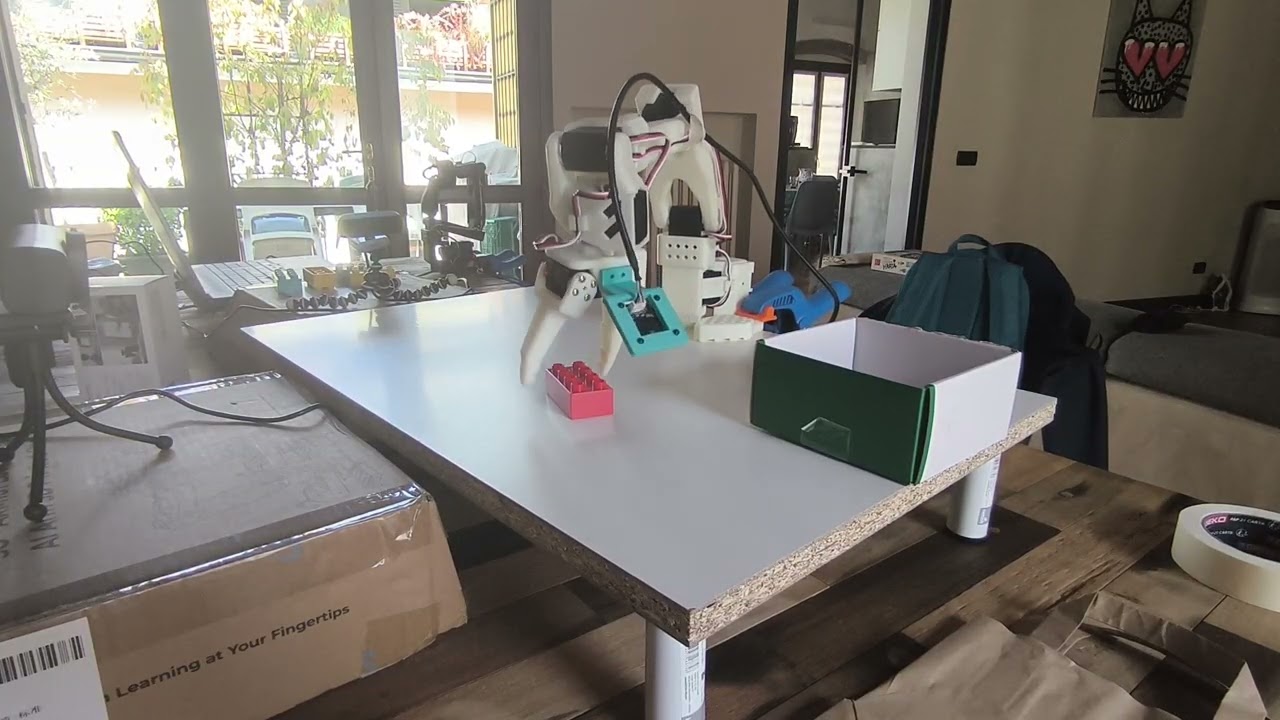
Horizontal block, centred, good light.
Rotated block, 45° angle, before the hard-example fix.
Lessons & Beyond
What worked, what didn't, and the easier path
Lessons Learned
Every symptom hid its root cause two layers below
- Profile first, optimise second — compute was never the bottleneck
- Dataset as ground truth — every bug was found in the data
- Image augmentation — one flag fixed lighting sensitivity
- Build diagnostic tools — 600 lines saved weeks
- Bigger models — irrelevant when the data is wrong
- More epochs — loss plateaued; it wasn't underfitting
- Removing the wrist camera — that view is critical
- Ignoring hardware — the answer was a 10-minute recalibration
The easier way
What If the Hard Parts Were Automated?
Cyberwave — write Python once, run it in sim and on real hardware
- Digital twins — pre-configured simulation environments
- Cloud training — managed GPU, no OOM debugging
- Automated deployment — sim-to-real handled
- SO101 support — voice-controlled pick-and-place tutorial
| Challenge | Us | Cyberwave |
|---|---|---|
| Calibration | 3 weeks | auto-detected |
| Camera setup | 2 days | pre-configured |
| Training infra | 1 day | cloud GPU |
| Diagnostics | 1 week | dashboard |
When to Go Local vs Cloud
Neither is wrong — they serve different goals
- You're learning how robot learning works
- Doing custom research on novel policies
- Working within a tight budget
- You need full control of every parameter
- Building for production deployment
- Working in a team — shared datasets & models
- You need to scale beyond one robot
- You want built-in observability
Thank You
Questions? Applausi liberi.
"Built with love, frustration, and a 17.5° calibration drift."